Webcam Online Viewer Worldwide: A Comprehensive Review
Screenshots

Introduction
Webcam Online Viewer Worldwide is an innovative application developed by Android Apps & Tools, allowing users to access thousands of live video streams from public surveillance and security cameras positioned globally. This app is a treasure trove for travelers and curious minds alike, offering a unique way to explore different locations right from the comfort of your smartphone or tablet. With over 20,000 live IP cameras integrated into the app, users can enjoy real-time video feeds from virtually every corner of the Earth, making it an exciting tool for planning vacations or simply satisfying a wanderlust.
Graphics & Gameplay
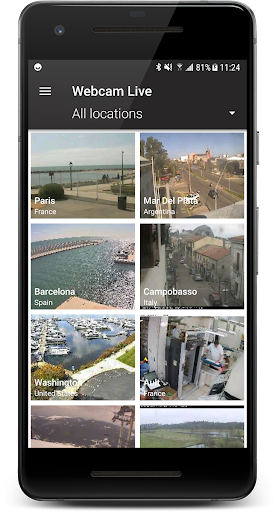
The visual design of Webcam Online Viewer Worldwide is clean and user-friendly, making navigation straightforward for users of all ages. Upon opening the app, you are greeted with a vibrant interface showcasing a world map dotted with camera locations. Icons representing various categories—such as cities, beaches, and wildlife—are clearly displayed, inviting exploration. The app features stunning high-definition live feeds, allowing users to view detailed scenes as if they were there in person.
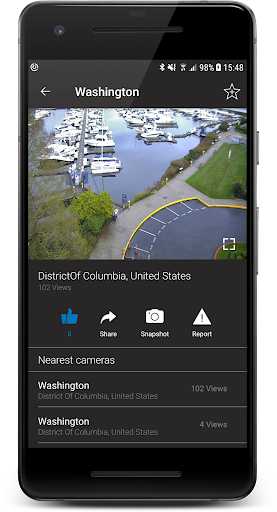
The screenshots reveal a well-organized layout with easy-to-read fonts and intuitive icons. Users can quickly identify camera categories, view individual feeds, and access additional information about each camera location. The overall aesthetic is modern and appealing, contributing to a pleasant user experience. The app also emphasizes functionality, ensuring that users can watch live streams with minimal buffering, enhancing the overall viewing experience.
Key Features
- Global Access: View thousands of live streaming webcams from around the world, covering various locations and categories.
- Search Functionality: Easily find cameras by keywords or browse by country, including regions like the United States, UK, Canada, and Australia.
- Category Selection: Explore webcams categorized by cities, weather conditions, road traffic, animal behavior, and more, making it easy to find specific interests.
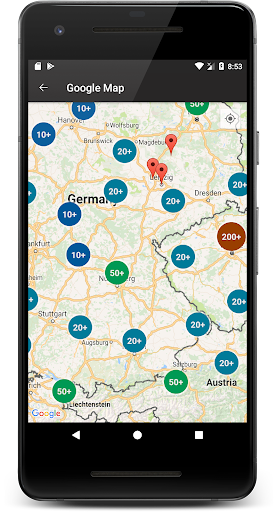
- Map Integration: View camera locations on an interactive map, helping users understand where the feeds are coming from.
- Save Camera Shots: Capture and save snapshots from live streams to revisit later or share with friends.
- Travel Planning: Utilize the app to scout holiday destinations, study different cultures, or simply enjoy a virtual tour of various locations.
- Real-time Updates: Stay informed about current events, weather conditions, and traffic situations through live feeds.
Mod Features
For those seeking an enhanced experience, here are some plausible mod features that could elevate the functionality of Webcam Online Viewer Worldwide:
- Premium Unlocked: Gain access to exclusive content, including premium camera streams and additional categories without any restrictions.
- No Ads: Enjoy an uninterrupted viewing experience by eliminating all advertisements from the app.
- Unlimited Money: Utilize an in-app currency that allows you to unlock premium features and additional camera feeds without any limitations.
- Enhanced Filters: Apply advanced filters to narrow down camera searches based on specific criteria, such as time of day or camera quality.
- Offline Viewing: Download selected camera feeds for offline viewing, perfect for travel to areas with limited connectivity.
How to Install APK on Android
Installing the Webcam Online Viewer Worldwide APK on your Android device is a simple process. Follow these steps to get started:
- Enable Unknown Sources: Go to your device's settings, navigate to 'Security', and enable 'Unknown Sources' to allow the installation of apps from sources other than the Google Play Store.
- Download the APK: Visit the original URL here to download the APK file onto your device.
- Locate the File: Open your file manager and navigate to the 'Downloads' folder to find the downloaded APK file.
- Install the APK: Tap on the APK file to initiate the installation process. Follow the on-screen instructions to complete the installation.
- Open the App: Once installed, locate the Webcam Online Viewer Worldwide icon in your app drawer and tap to open the application.
Note: Always ensure that you are downloading APK files from reputable sources to avoid security risks. It’s advisable to use antivirus software to scan any files before installation.
Conclusion
Webcam Online Viewer Worldwide is a remarkable app for those who enjoy exploring the world from their devices. With its vast selection of live feeds, user-friendly interface, and unique features, it provides endless opportunities for discovery and entertainment. Whether you're planning your next travel adventure or simply looking to satisfy your curiosity, this app is a must-have for every explorer at heart.
Ready to start your global webcam adventure? Download Webcam Online Viewer Worldwide now!