
Screenshots



Introduction
The Open Caption Finder is an innovative mobile application developed by Look Loaded, Inc., designed specifically for moviegoers in the United States who prefer to watch films with open captions. Open captions, unlike closed captions, are visible to everyone in the theater, making them crucial for individuals who are deaf or hard of hearing. This application provides a seamless way to find local open caption showtimes, ensuring that users can enjoy their cinema experience without the need for special glasses or devices. With a commitment to accessibility and inclusivity, Open Caption Finder is a project born from the passion of film enthusiasts, including a co-founder who is deaf, aiming to simplify the process of locating open caption screenings across the country.
Graphics & Gameplay
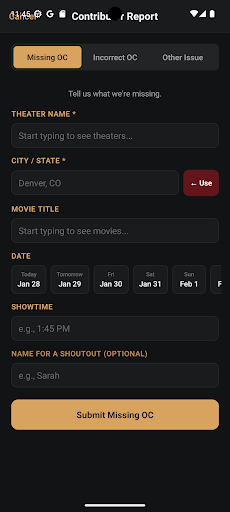
The visuals of the Open Caption Finder app are user-friendly and aesthetically pleasing. Upon opening the app, users are greeted with a clean layout that is easy to navigate. The main screen showcases a search bar prominently at the top, allowing users to quickly input their location for nearby showtimes. Below the search functionality, the app displays a list of available movies with their showtimes and theaters, each presented in an organized format. The colors used in the app are vibrant yet soothing, creating an inviting atmosphere for users. Additionally, there are intuitive icons and buttons that enhance the overall user experience, making it easy to heart favorite showtimes or report incorrect listings. Screenshots depict a visually appealing interface, highlighting various sections of the app and demonstrating its functionality.
Key Features
- Location-based Search: Easily find open caption showtimes within a 25-mile radius or anywhere in the US.
- Upcoming Showtimes: View showtimes for the next 7 days, ensuring that users can plan their movie outings in advance.
- Direct Ticket Purchase: Tap on any showtime to be redirected to ticket purchasing options, streamlining the process.
- Favorite Showtimes: Users can heart their favorite showtimes, making it easier to track preferred films.
- Community Reporting: The app allows users to report missing or incorrect OC listings, fostering a collaborative environment among users.
- Leaderboard Feature: Engage with the community by seeing top contributors who help maintain accurate showtime listings.
- Theater Coverage: The app supports over 1000 theaters, including popular chains like AMC, Regal, and Alamo Drafthouse, with new theaters continually being added.
Mod Features
While the Open Caption Finder app is free to use, users often seek additional features that enhance their experience. Here are some creatively invented mod features that could be beneficial:
- Premium Unlocked: Gain access to exclusive features such as advanced search filters for specific genres, ratings, or times.
- No Ads: Enjoy uninterrupted browsing and viewing by removing ads from the app, making for a smoother user experience.
- Unlimited Favorites: While the app allows users to heart showtimes, a mod feature could provide unlimited favorites, allowing for a more personalized experience.
- Enhanced Reporting Tools: Improved tools for users to report inaccuracies or suggest new theaters more effectively, ensuring the community remains informed.
- Exclusive Offers: Receive special discounts or promotions for ticket purchases through selected theaters partnered with the app.
How to Install APK on Android
Installing the Open Caption Finder APK on your Android device is a straightforward process. Follow these steps for a successful installation:
- Enable Unknown Sources: Go to your device's settings. Navigate to Security & Privacy, then enable the option to allow installations from unknown sources.
- Download the APK: Visit the official download page at Open Caption Finder Download to obtain the APK file.
- Locate the APK File: Open your device's file manager and navigate to the folder where the APK file was downloaded.
- Install the APK: Tap on the APK file to begin the installation process. Follow the prompts to complete the installation.
- Open the App: Once installed, locate the Open Caption Finder icon on your home screen, tap it, and start exploring open caption showtimes near you!
Conclusion
The Open Caption Finder app is a valuable tool for anyone seeking accessible movie experiences. With its intuitive interface, comprehensive theater coverage, and community-driven features, it stands out as an essential resource for deaf and hard-of-hearing moviegoers. Whether you're a film enthusiast or simply looking to enjoy movies without barriers, this app is definitely worth downloading.
Ready to enhance your movie-going experience? Download the Open Caption Finder app now and never miss an open caption showtime again! Download here.