
Battery Plus: Health & Monitor - Detailed Review
Screenshots



Introduction
Battery Plus: Health & Monitor is a powerful battery management application developed by Codable Inc. designed specifically for Android devices. This app provides users with comprehensive tools to check their battery’s health, monitor charging speed, and track battery life, all within a clean and user-friendly interface. With features like real-time battery data, overheating alerts, and usage analytics, Battery Plus aims to help users extend their battery lifespan and optimize their charging habits. Whether you are an everyday user or a tech enthusiast, this app offers essential insights into your device’s battery performance.
Graphics & Gameplay
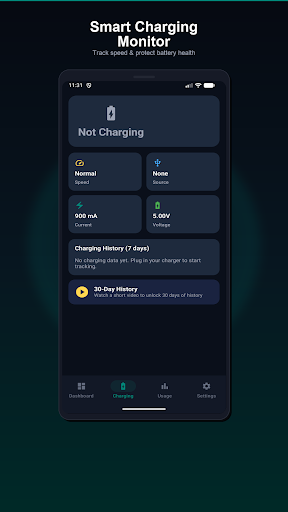
The visual design of Battery Plus is sleek and modern, adhering to Material Design 3 principles, which ensures a polished and intuitive user experience. The application features vibrant and informative dashboards that showcase battery statistics through animated gauges and easy-to-read charts. For instance, users will see a colorful animated gauge indicating the battery level status, complemented by temperature readings and health indicators. The app’s widgets come in three sizes, allowing users to customize their home screens with battery stats at a glance, making it not only functional but also aesthetically pleasing. The engaging graphics and clear layout contribute to a seamless interaction, making it easy for users to access critical battery information quickly.
Key Features
- Battery Health Check & Monitor: Instantly assess your battery’s health with performance ratings (Good, Fair, Poor) and monitor its temperature with overheat alerts.
- Charging Speed Tracker: Detect charging speeds (Slow, Normal, Fast, Turbo) and view a 7-day charging history chart.
- Battery Life & Usage Analytics: Track screen-on time, identify top battery-draining apps, and analyze battery drain patterns with a 24-hour battery level chart.
- Battery Care Tips: Access expert advice on extending battery life, including optimal charging habits and environmental factors affecting battery health.
- Home Screen Widgets: Choose from three widget sizes to display battery percentage, health, temperature, and more on your home screen.
- Customizable Alerts: Set low battery warnings, high temperature alerts, and receive notifications upon charge completion.
- Fully Customizable Settings: Adjust temperature units, low battery thresholds, widget refresh rates, and choose between light and dark modes.
Mod Features
- Premium Unlocked: Access all premium features without any restrictions, including advanced battery analytics and extended history tracking.
- No Ads: Enjoy an ad-free experience while using the app, allowing for uninterrupted monitoring and analysis of your battery.
- Unlimited Battery Insights: Gain unlimited access to comprehensive reports and insights regarding your battery’s health and usage patterns.
- Custom Themes: Personalize the app interface with various themes and color schemes to match your aesthetic preferences.
- Enhanced Widget Customization: Unlock additional widget options and styles for more tailored home screen displays.
How to Install APK on Android
Installing the Battery Plus APK on your Android device is a straightforward process. Follow these steps to get started:
- Download the APK: Visit the official download link provided below to obtain the Battery Plus APK file.
- Enable Unknown Sources: Go to your device's settings, navigate to 'Security', and enable 'Install from Unknown Sources' to allow installation from sources other than the Google Play Store.
- Locate the APK File: Using a file manager, find the downloaded APK file in your device's downloads folder.
- Install the APK: Tap on the APK file and follow the on-screen instructions to install the application.
- Launch the App: Once installed, open Battery Plus from your app drawer and start monitoring your battery health!
For a stress-free experience, ensure that your device meets all necessary permissions for the app to function properly.
Call to Action
If you’re ready to take control of your device’s battery health and optimize its performance, download Battery Plus: Health & Monitor today! Visit the link below to get started: